If during the Chronos eStockCard Inventory Software installation, the followings message appear:-
” SQL SERVER SETUP CANNOT INSTALL FILES TO THE COMPRESSED OR ENCRYPTED FOLDER: C:/PROGRAM FILES/. TO CONTINUE, MAKE SURE THAT YOUR INSTALLATION DIRECTORIES ARE NOT COMPRESSED OR ENCRYPTED, OR SPECIFY A DIFFERENT DIRECTORY, AND THEN RUN SQL SERVER SETUP AGAIN.”
Then it is due to the compression on the file system.
Please perform as follows:-
1. Go to C: drive and then right click & select Properties
2. Untick “Compress this drive to save disk space”
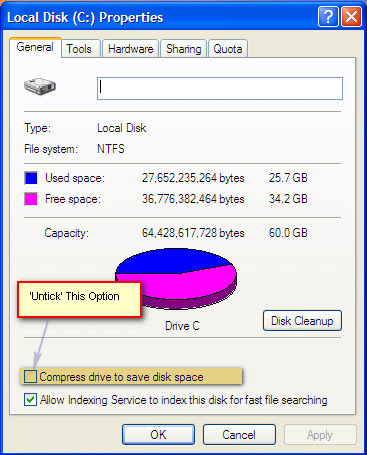
3. Finally click OK and then re-run the Installation again
Related posts:
- I am unable to install the eStockCard Warehouse System due to MS. SQL Server Native Client not being found during installation. What should I do?
- How to Set the eStockCard Server from my own SQL Server 2005 into the PC server?
- SQL Server 2005 Installation Problem on the eStockCard Inventory Software – Troubleshooting Steps
- Private: Updating eStockCard Client and Server
- Minimum requirements to run eStockCard Inventory Software