Chronos eStockCard Inventory Software | Inventory System - For Better Warehouse Inventory Control

  • Home
  • Product Overview  Inventory System | Inventory Software Features & Benefits
    • Warehouse Edition
    • Premier Edition
    • Mobile Edition
    • Compare Products
    • Case Studies
  • Try & Buy
  • FAQs
  • Support Center
  • Contact Us
Knowledgebase

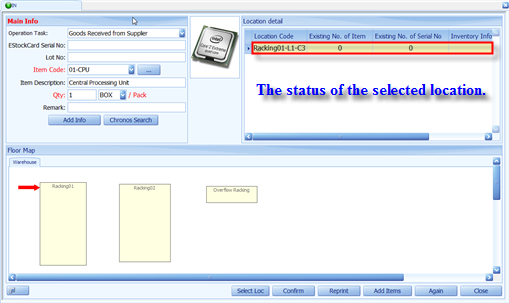
Can I view the Inventory Qty at the IN screen at the respective location when performing IN operation?

April 27th, 2011, Filed in Features & Tips

At the IN screen after click the Chronos Search button, you would be able to view the Inventory Qty/Info for the selected location at the Inventory Info column which is under the Location Details.


Related posts:

  1. How to search for Item at Operation screen?
  2. How to use the Operation Task at IN and OUT screen?
  3. What is the function of “Auto Update Option” at the Operation Setting screen?
  4. Customize a field name into the IN screen
  5. How to Import Data into the Chronos eStockCard Inventory Software
  • Categories

    • Document / Barcode Design
    • Editions & Licensing
    • FAQs
    • Features & Tips
    • General
    • Install, Activate & Update
    • User Manual – eStockCard v3 Premier
    • User Manual – eStockCard v3 Warehouse
  • Latest Articles

    • Change the Daily Backup of the eStockCard Database
    • Operation Setting – Transaction Tab
    • Splitting of Qty Inventory in Good Receiving
    • Searching the Location via Tree Structure for eStockCard v3 Warehouse
    • How to install the eStockCard Server into SQL Server 2008R2 PC?
  • Product
  • Home
  • Warehouse Edition
  • Premier Edition
  • Mobile Edition
  • Compare Products
  • Industrial Case Studies
  • Software Download
  • Purchase Online
  • Frequently Asked Questions
  • Inventory Software Articles
 
  • Support
  • Client Center
  • Support Center
  • Knowledgebase
  • Tutorial Videos
  • User Manuals
  • News & Updates
 
  • Community
  • Blog
  • Twitter
  • Facebook
 
  • Company
  • Contact Us
  • Reseller
Copyright © 2008-2012 Chronos eStockCard Inventory Software     |    Chronos Process Integration Sdn Bhd    |    All rights reserved.    |   Sitemap
Share